HendricksonRose.com
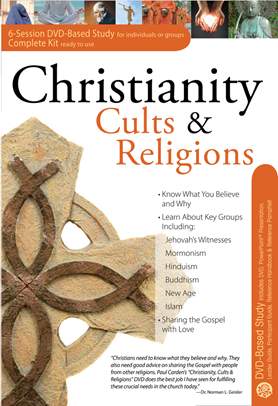
Christianity, Cults & Religions 6-Session DVD Based Study Complete Kit
 A Rose Publishing Title
Product Description
The Christianity, Cults & Religions ready-to-use DVD study kit compares Christianity to 6 major religions and cults, including Islam, Jehovah’s Witnesses, Buddhism, Mormonism, Hinduism, and more! It features a basic overview of each religion—but it also takes it a step further by sharing practical dos and don’ts for reaching out to others in a respectful way. It even explains how to correct common misunderstandings, as well as the history of each religion. Strengthen your understanding of Christianity and how it compares to other belief systems with this must-have study!
Lead a Bible study on Christianity, Cults & Religions—without being an expert! This all-inclusive DVD kit is packed with:
Get a Solid Overview on Christianity, Cults, and Religions
There is a lot of false information circulated about various religious groups, causing misunderstandings and confusion. Without knowing the truth about other’s religions, it is difficult to reach out to them. Instead of flipping back and forth between books, enjoying getting a solid overview with this DVD study:
The six sessions:
Additional Participant and Leader Guides available for purchase.
Lead a Bible study on Christianity, Cults & Religions—without being an expert! This all-inclusive DVD kit is packed with:
- 6 Teaching Sessions on DVD
- Leader Guide (Printed and PDF Download)
- Participant Guide (Printed)
- PowerPoint Presentation with over 250 ready-to-use slides
- Christianity, Cults & Religions Pamphlet—compare Christianity to 20 religions and cults
- Handbook—112-page book features side-by-side charts on 35 world religions and cults
- Banners/Promotional Flyers (PDF)
Get a Solid Overview on Christianity, Cults, and Religions
There is a lot of false information circulated about various religious groups, causing misunderstandings and confusion. Without knowing the truth about other’s religions, it is difficult to reach out to them. Instead of flipping back and forth between books, enjoying getting a solid overview with this DVD study:
- Find out how world religions/cults answer 8 key questions: Who is God? Who is Jesus? What happens after death? How is a person “saved”? Who is the Holy Spirit? and more.
- Get a brief overview that shows key information at a glance on each religion/group, including: key writings, key leader, date founded, interesting beliefs and practices, etc.
- Easily compare Christianity to these belief systems: Islam, Mormonism, Jehovah’s Witnesses, Buddhism, Hinduism, and New Age
The six sessions:
- Definitions, Discernment, and Defending the Faith—Covers the six key elements that highlight the differences between Christianity and other religions and cults—Revelation, God, Jesus Christ, Salvation, the Church, and the Future (false predictions). Gives an overview of what other groups believe.
- Essential Christian Doctrine—Covers the key beliefs of Christianity and where the cults differ.
- Jehovah’s Witnesses (Watchtower Society)—History, founder, practices, beliefs, and dos and don’ts.
- Mormonism (Latter-day Saints)—History, founder, practices, beliefs, and dos and don’ts.
- Eastern Religions: Hinduism, Buddhism, and New Age.—History, founder, practices, beliefs, and dos and don’ts.
- Islam—History, founder, practices, beliefs, and dos and don’ts.
Additional Participant and Leader Guides available for purchase.
Product Details
- Published:
- July 21, 2010
- Binding:
- DVD-ROM
- ISBN:
- 978-1-59636-413-4
- Case Qty:
- 10